The platform

No system to learn. Just a conversation.

Your people talk to Coach Taylor. Coach Taylor knows their role, their goals, and what they practiced last week, and gets them into the next live session. Morgan sets everything up. Nobody has to become an administrator.

See what your people get
Coach Taylor, recorded in the platform

How it works

From a spreadsheet to a function.

Day one

Morgan sets up your whole organization in a conversation.

Send a spreadsheet. Morgan imports your people, maps roles and departments, assigns the compliance library with a window, builds the first learning paths, and sends invitations. You answer questions. Nobody opens an admin panel.

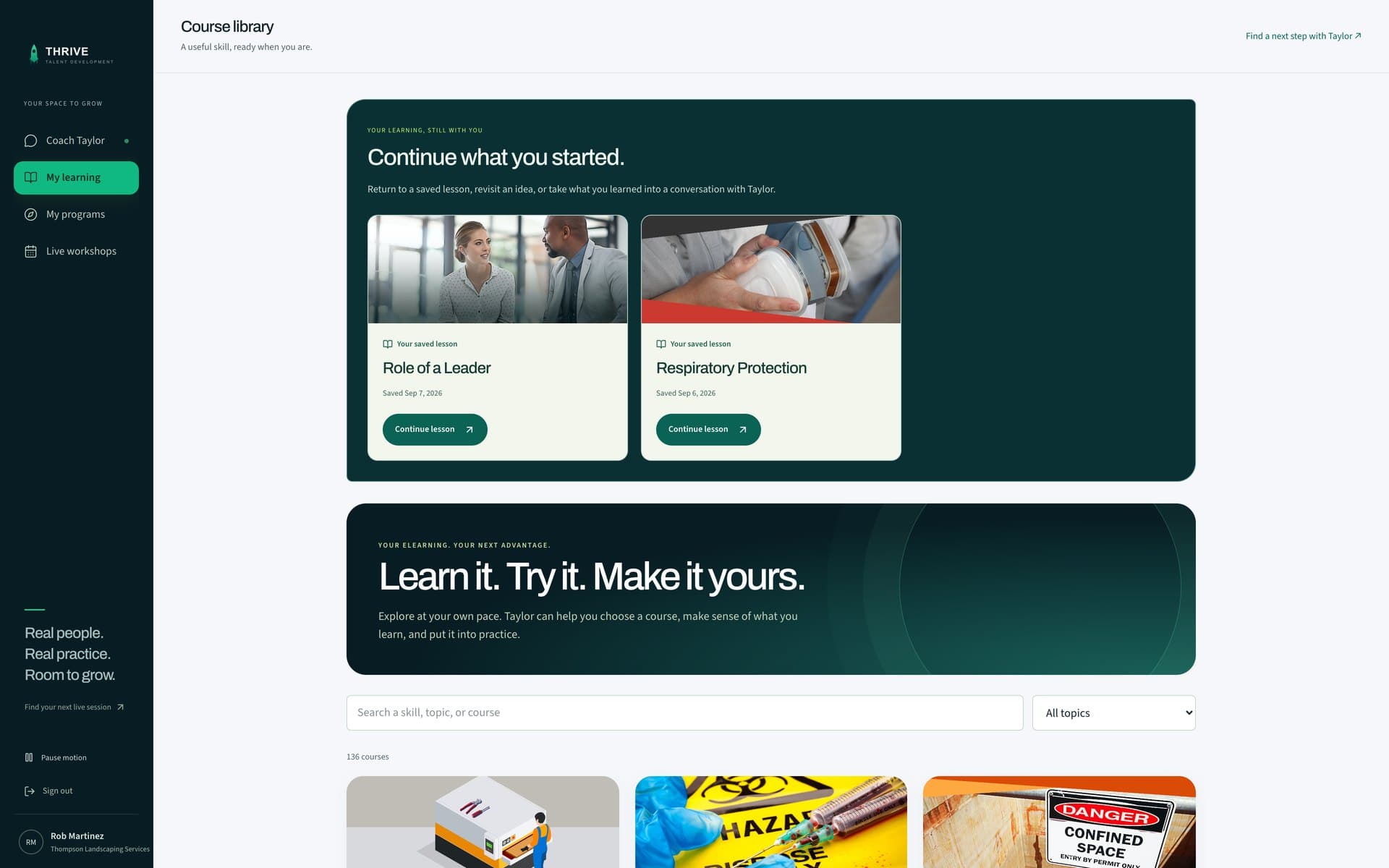
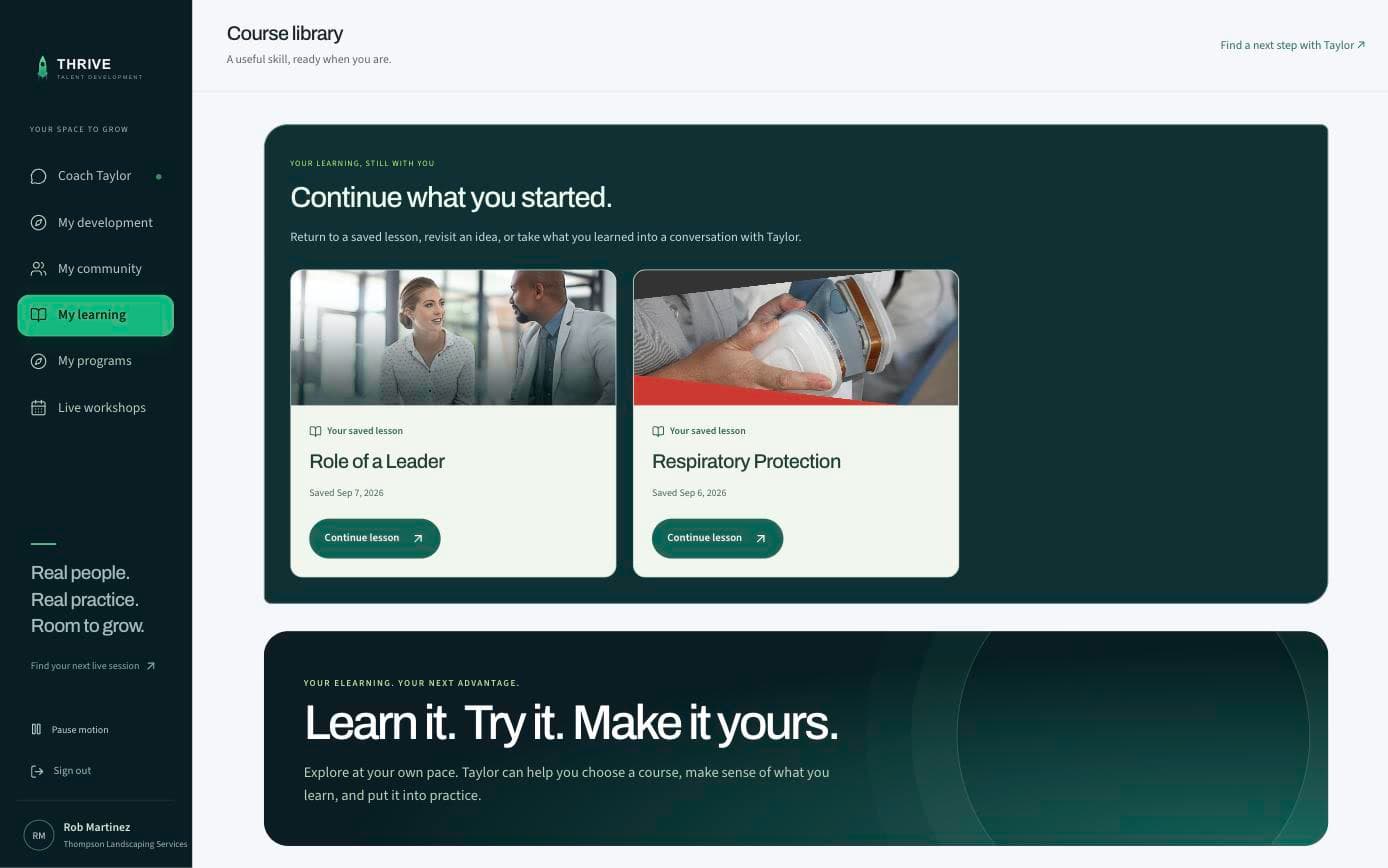
The course library inside the platform: saved lessons first, then every course by topic

Every day after

Coach Taylor knows each person and keeps the thread going.

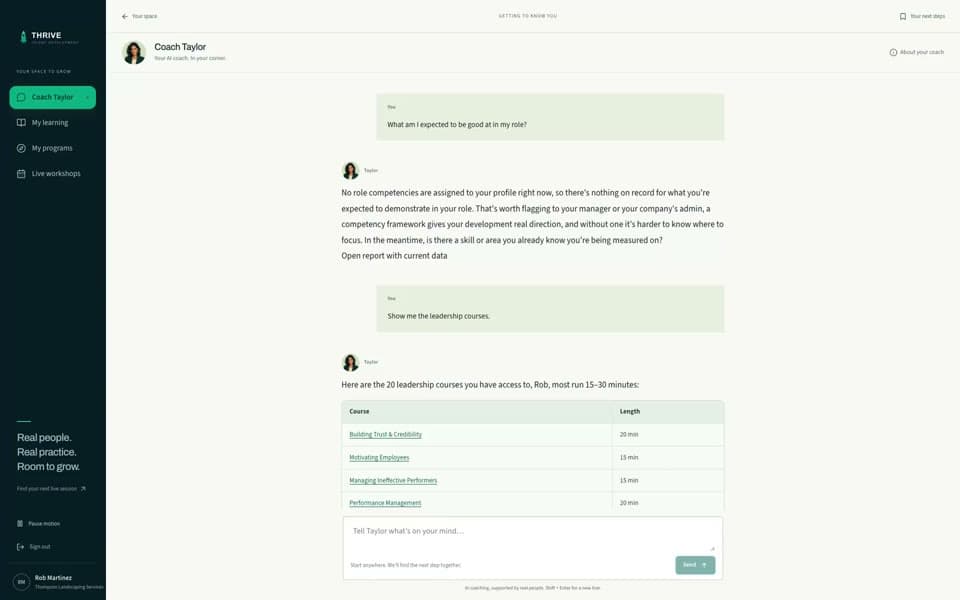
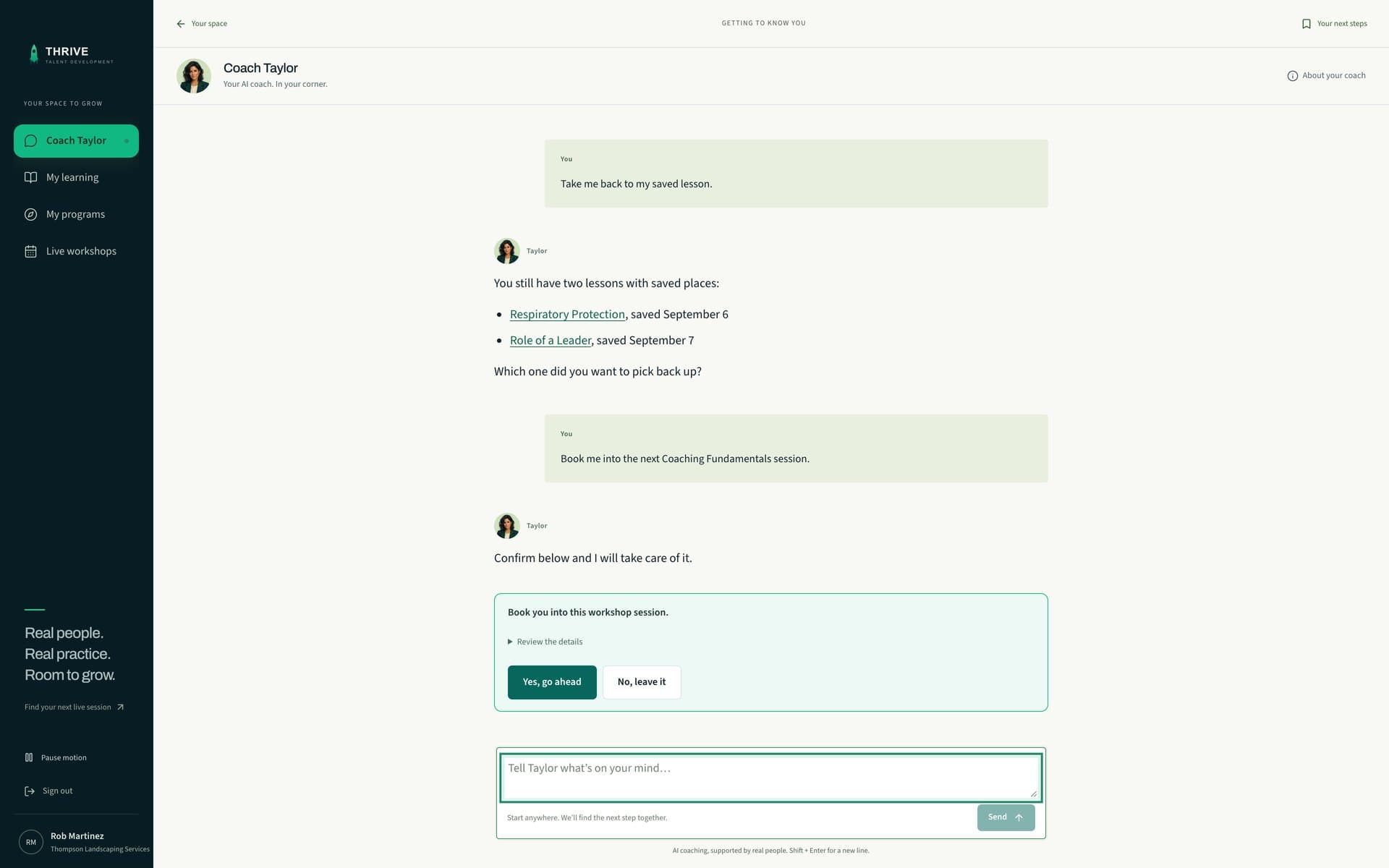
It knows the role, the goals, and what was practiced in the last live session, so a person who asks gets an answer about their own work rather than a search result. It recommends the next thing and holds seats when someone asks. It answers on request; it does not chase people yet.

Coach Taylor finding a learner's saved lessons and booking a workshop session, inside the platform

On the calendar

Live sessions with someone who has done the job.

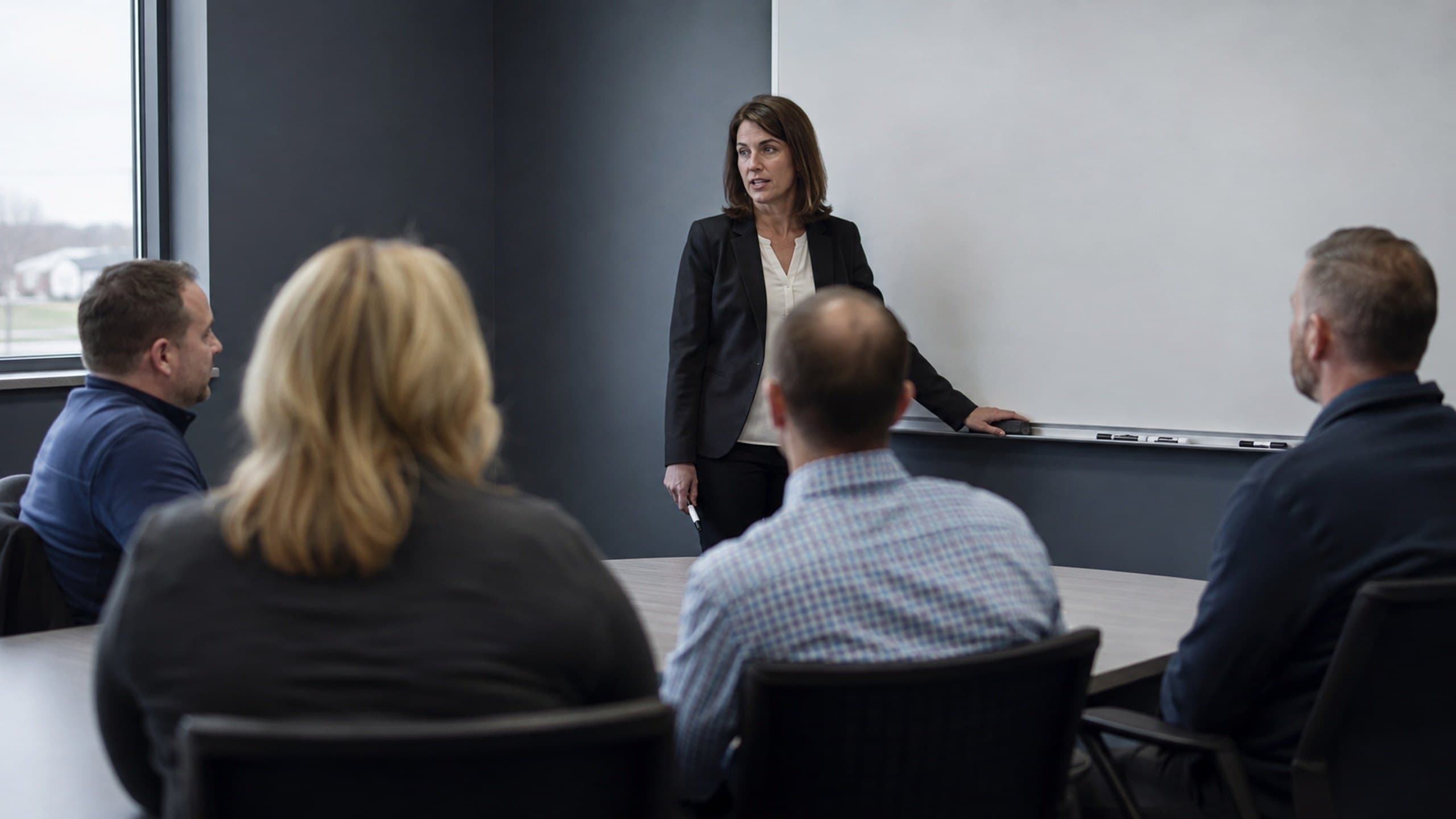
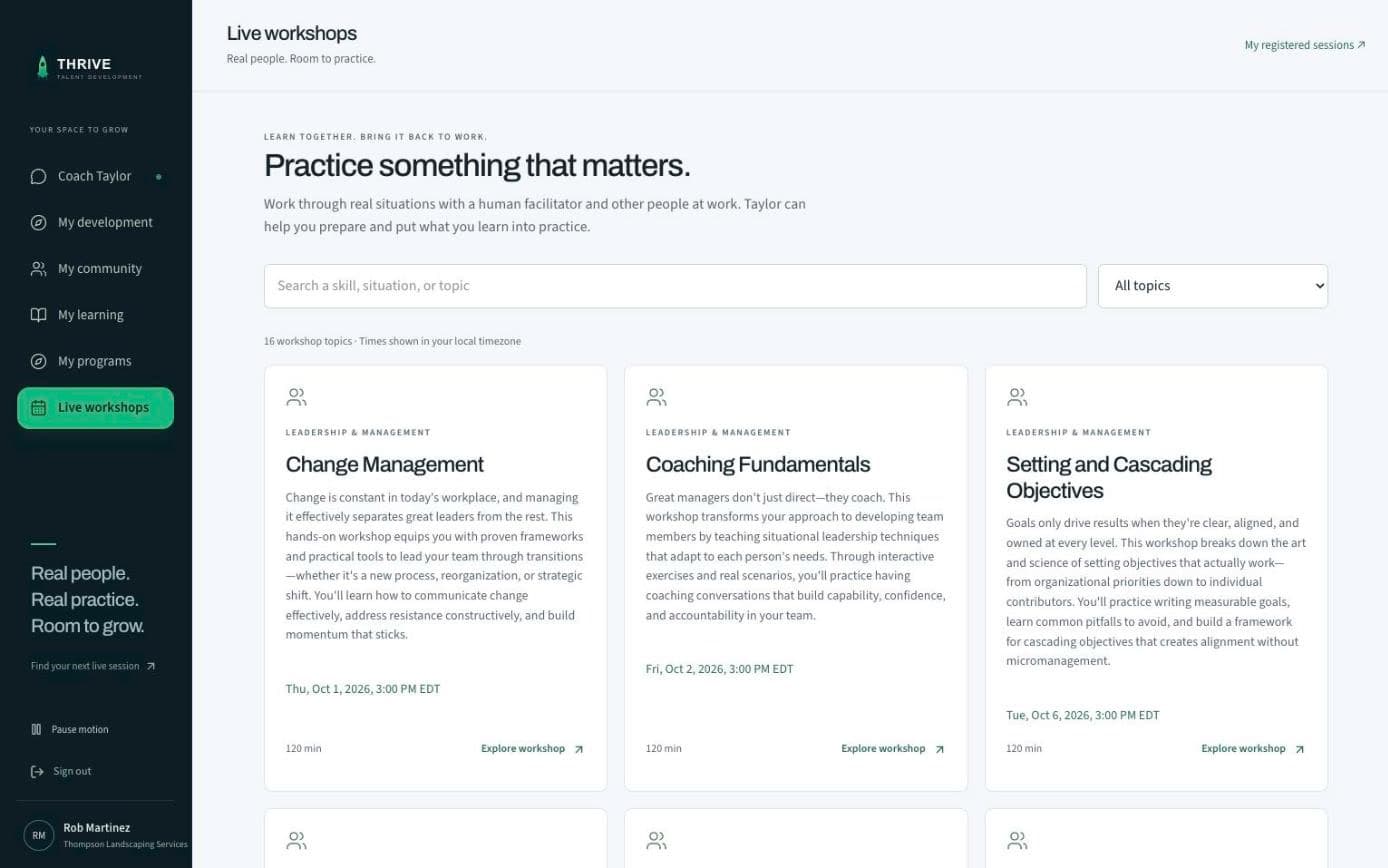
Sixteen workshop topics, each running once a month at 3:00 PM Eastern, two hours, 25 seats, live on Microsoft Teams. Programs run in cohorts. The facilitator watches each person practice and coaches the delivery.

A facilitator at a whiteboard with a small group around a table

Photograph, not a Thrive session. Sessions run live on Microsoft Teams.

When leadership asks

Reporting by person, team, and department, plus the work itself.

Completion, attendance, and progress are visible without a dashboard to learn. In programs, applied work is reviewed by your own managers, so the evidence is behavior on the job, not a checkbox.

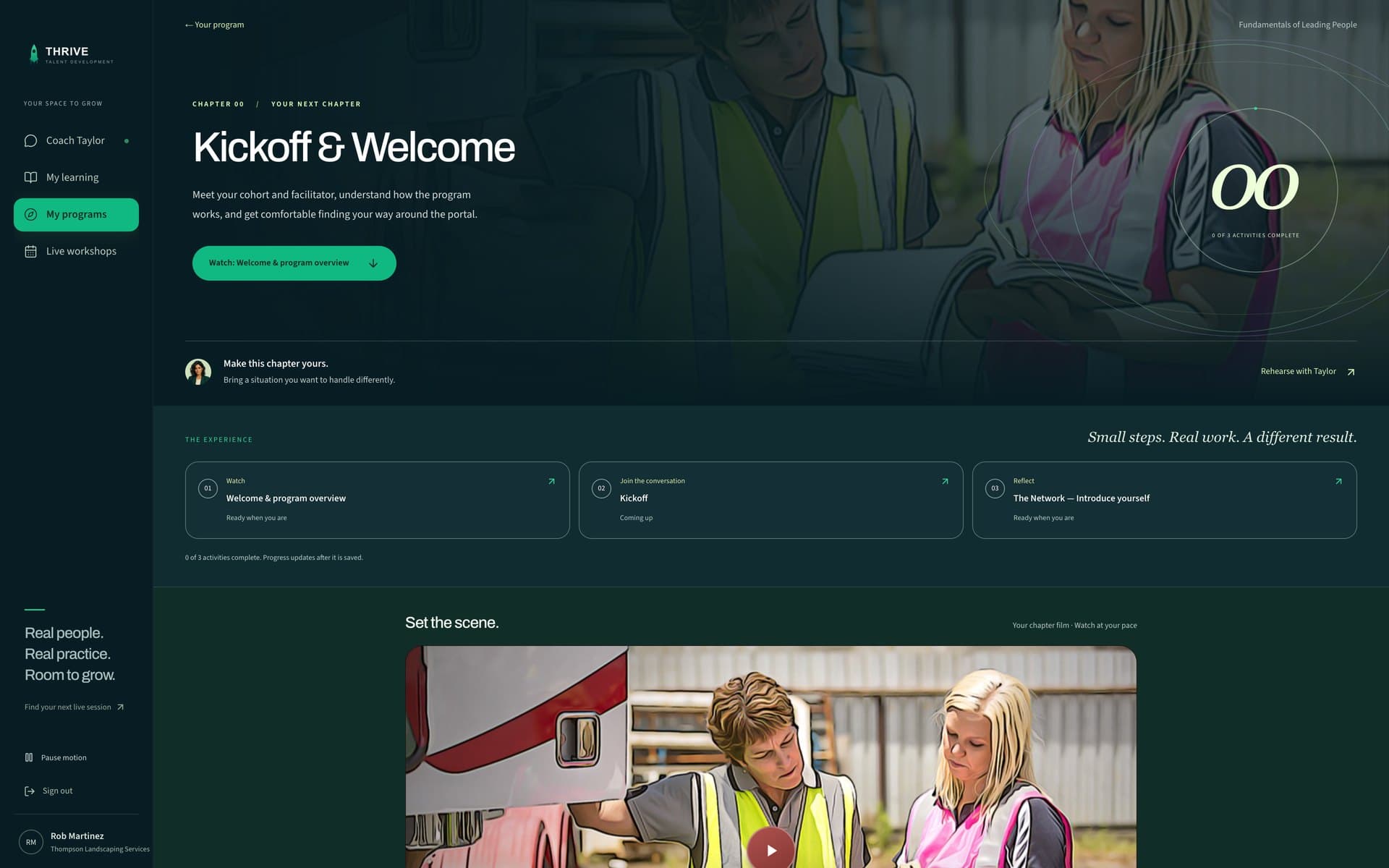
A learner's program week with its activities and how many are complete

After you say yes

See the learning experience before you buy.

Morgan guides setup from your employee list, with your approval of roles, assignments, and invitations. Coach Taylor helps learners when they ask; it does not send scheduled reminders. Your team owns follow-up and reviews progress. These screens were recorded in the running platform and refreshed September 7, 2026. They show the product, not evidence of customer outcomes.

  1. 01

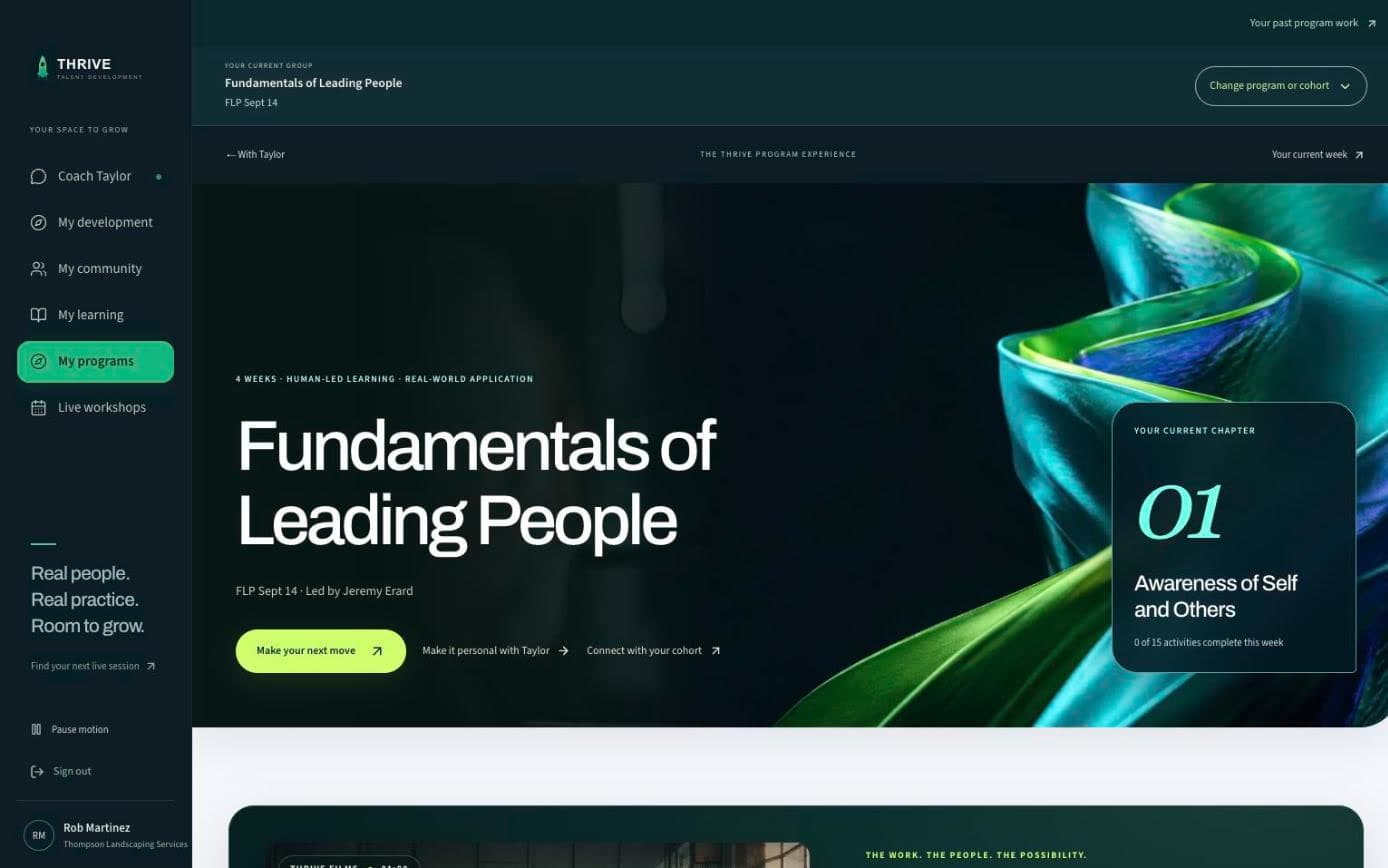
    The week, in one place.

    Your program, the chapter you are in, how much of it is done, and the program films, with Taylor one click away.

    thrivetalentdevelopment.com/programs/my
    The My program page for Fundamentals of Leading People: the cohort, the current chapter, 01 Awareness of Self and Others, and how many of its activities are done
  2. 02

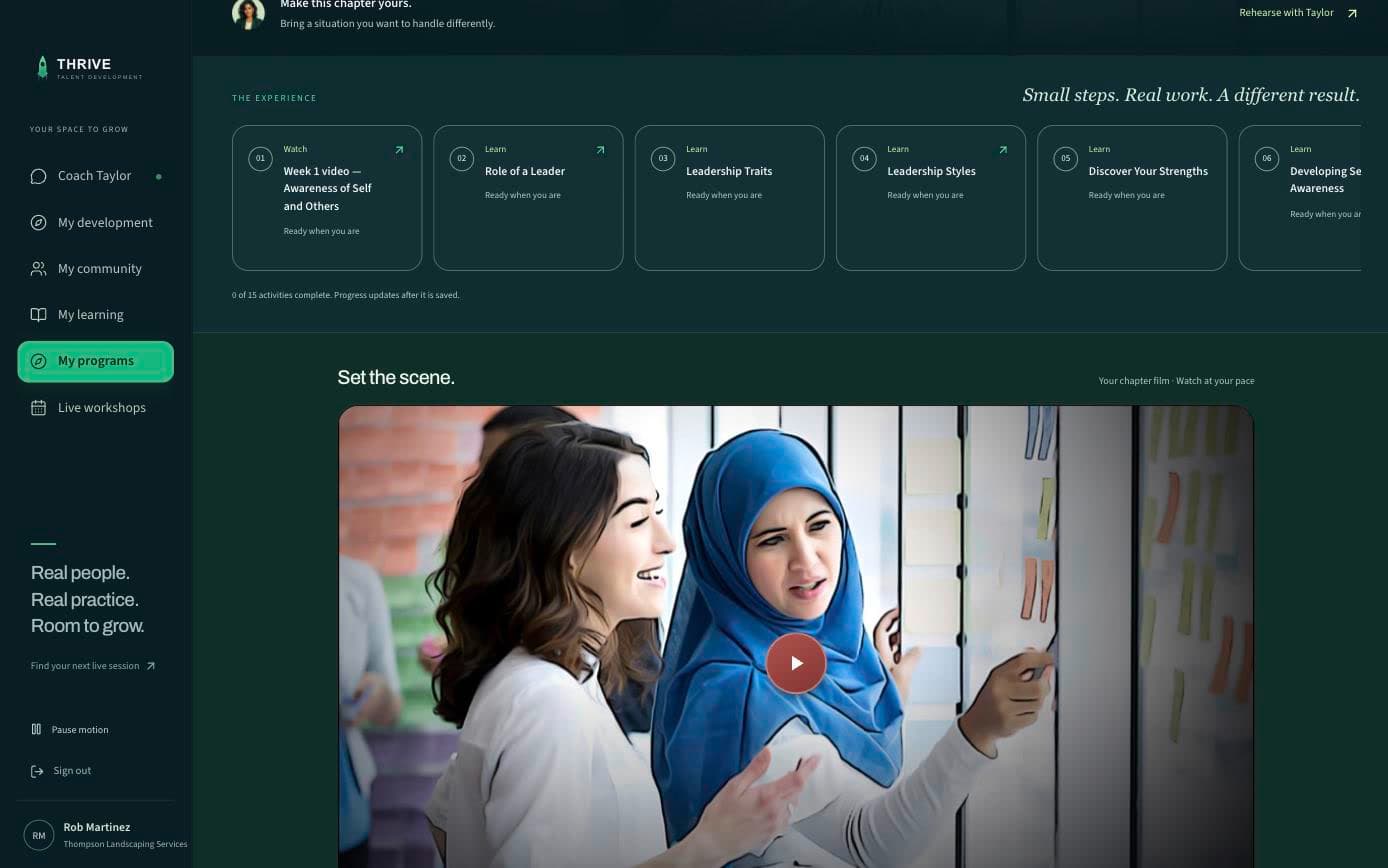
    Open the week.

    Everything the week asks for, in order. Chapter one has fifteen: the week film, nine lessons, two live sessions, a reflection, a one-on-one with the facilitator, and a check of what stuck. Recorded on chapter one, where the demonstration learner is; later weeks open on the cohort's schedule and have the same shape.

    thrivetalentdevelopment.com/programs/my/week/1
    Chapter one of the program, scrolled to its numbered activities, a film and five lessons in view, and the chapter film below
  3. 03

    Live workshops, on the calendar.

    Sixteen topics, two hours each, twenty-five seats, every one included. Register from the list or ask Coach Taylor to do it. The dates on this screen come from the platform calendar, which is why they are never a promise this page made.

    thrivetalentdevelopment.com/workshops
    The live workshops page inside the platform: each topic with what it covers, its next date, its two-hour length, and a link to explore it
  4. 04

    Coach Taylor, between sessions.

    Ask it what the week is about and where you stand, and it answers from your program. Ask it about the work, before or after a session.

    thrivetalentdevelopment.com/coach
    A Coach Taylor conversation: the learner asks for their saved lesson and gets both as links, then asks to be booked into a workshop and the coach holds the booking for one yes
  5. 05

    The library, by category.

    Every course your people can open. Saved lessons come first, each with the date it was left; below them, a search by skill or topic and every course by category, with the compliance library free for every company. The catalog on the courses page is the same list.

    thrivetalentdevelopment.com/library
    The course library: the learner's two saved lessons, Role of a Leader and Respiratory Protection, each with the date it was saved and a Continue lesson button
  6. 06

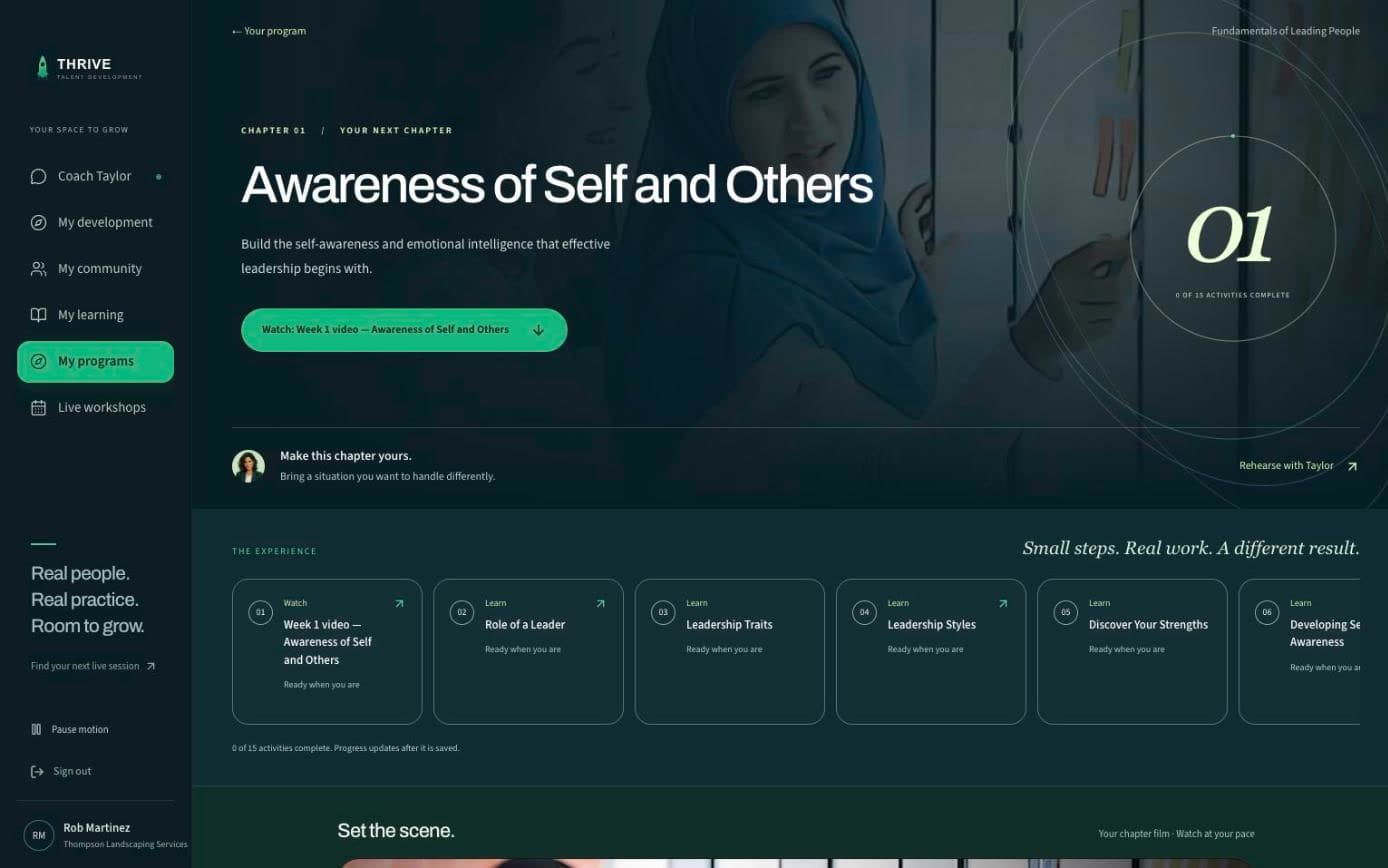
    Progress, week by week.

    This is the learner's own screen: the current chapter, and the ring that counts how many of its activities are complete. The test learner has not started chapter one, so it reads 0 of 15. Admins get the same for every person, in the company report and the roster export.

    thrivetalentdevelopment.com/programs/my/week/1
    The top of chapter one, Awareness of Self and Others: the chapter number ring reading 0 of 15 activities complete, and the first activities below
  7. Captured from a learner account in the running platform; refreshed September 7 and 26, 2026. Not a mockup, not a render, not a design file.

    What is not in these screens: a reminder before a session. Coach Taylor answers when someone asks it something; it does not yet reach out on a schedule. That one is on the roadmap.

Compared with an LMS

The difference is who does the work.

A learning management system gives you a library and an admin panel, then leaves the assigning, chasing, and reporting to you. Thrive gives you the function: people who teach because they have done the job, and agents who handle the administration.

If you already have an LMS, Thrive runs beside it as the live, coached layer it does not have.

A program week inside the Thrive platform: the chapter, its activities, and the chapter film

Where the people still are

Three formats, one function.

Design and live teaching are the two jobs that still take people. The format changes with the need. The facilitator who has held the role, and the practice on real situations, do not.

Live workshops

16topics, each monthly on Microsoft Teams

Two-hour live sessions across leadership, operations, communication, and the modern workplace. 25 seats, a facilitator who has done the job, and practice on your people's actual situations.

The 64-session series runs September 8 – December 22, and nobody at your company had to book one of them.

See the topics and schedule →

Course library

135courses and growing

Self-paced courses in leadership, safety, HR compliance, sales, and new-professional skills, with the compliance library free for every company. New topics are added from what your people ask for.

This is the design job, done once and shared by every company at the same time.

Browse the library →

Blended programs

4weeks, one live cohort at a time

Fundamentals of Leading People: weekly live sessions, applied work reviewed by your company, 1-on-1 coaching, and a cohort that holds each other to it. Sales and new-professional paths follow the same shape.

This is design, teaching, coaching, and review, aimed at one person for 4 weeks.

See the programs →

Talk to ARIA

Ask what you would ask us.

ARIA works the way a good first call works. She asks who is involved and what should change, recommends the closest starting point, quotes the real price, and hands you to a person when you want one.

Start with one of these

Prefer a person? Say so in the conversation and the team follows up, or use the contact page.

Pricing

One flat price for the whole organization.

The band is set by how many people you employ, and that is the only thing it sets. Nothing is metered, nothing is held back for a higher band, and adding people inside your band costs nothing. Cohort programs are the one line priced per participant, because a facilitator and a fixed group size are a real constraint.

Thrive platform prices by organization size
Organization sizeMonthlyAnnualPer person, per month
Compliance LibraryAny size, no card. Start freeFreeFreeNothing, at any size.
Thrive Platformup to 100 employees$399$3,990$3.99 at 100 people, and less every time you hire inside the band.
Thrive Platform101-500 employees$799$7,990$1.60 at 500 people, and less every time you hire inside the band.
Thrive Platform501-2,500 employees$1,499$14,990$0.60 at 2,500 people, and less every time you hire inside the band.
Above 2,500 employeesSet with you, not looked up. Usually with private cohorts of your own.

This table has no column for what is included, because the answer does not change by band: live workshops, all one hundred thirty-five courses across five libraries with fifty-six of those free in the compliance library, Coach Taylor for every learner, Morgan for setup, and the reporting. Annual billing is ten months charged for twelve months of access. A monthly plan is one month, charged once; nothing renews on its own yet.

Start on a band →

Questions

Questions people ask before they call.

Is Thrive an LMS?

No. An LMS is a content repository you administer. Thrive is a talent development function: facilitators, a library, programs, and agents that run the administration. There is no system for your people or your HR team to learn.

What do the agents actually do?

ARIA has the first conversation with you and captures the details. Morgan sets your organization up. Coach Taylor works with each learner between live sessions. None of them teach; teaching is done live by facilitators who have held the role.

Does it work on Microsoft Teams?

Live workshops and program sessions run on Teams. Meeting links are issued after registration. The platform itself runs in a browser on any device.

Is our data secure?

Yes. Data is encrypted in transit and at rest, access is role-based, and the platform is hosted on SOC 2 certified infrastructure. Thrive itself is not SOC 2 certified yet; the security page says exactly what is and is not in place. The security page covers the detail.